الخميس، 16 ديسمبر 2010

Blended Learning


shahd rashed


What is Blended Learning?
Blended Learning is an approach to learning and teaching which combines and aligns learning undertaken in face-to-face sessions with learning opportunities created online.
New types of learning activities challenge our thinking as to how learning might be facilitated, creating new etiquettes of learning and teaching, and shifting the locus of control from the teacher to the learner.

Blended Learning Strategy and targets

The University has adopted a blended learning approach to its learning and teaching which is outlined in the Blended Learning Strategy. The University also has aspirations about the way in which this approach is to be achieved and has set blended learning targets.


Blended Learning Approach

A Blended Learning approach is one, which in most cases, will enhance and extend the learning opportunities for our 21st Century learners. The JISC study In their own Words describes what uses and expectations learners have for learning and teaching with technology.
Blended Learning is a blanket term for an approach, and the University sees that the following types of blend will be most useful in providing a complete learning environment for our students. These are:
  • full provision of module related documents in electronic format;
  • regular formative assessment with feedback,
  • that all face to face learning is interactive,
  • opportunities to learn from each other collaboratively,
  • electronic personal development planning,
  • and, the opportunity to submit all appropriate summative assessments electronically.
The rationale for supporting each of these perspectives on blended learning is that every learner is able to:
  • have 24/7 access to all learning content, and to ensure equality of access;
  • gauge their progress against the learning outcomes, to receive supporting feedback on this progress, and for staff to have information on student progress;
  • participate in, and engage with interactive learning opportunities in her or his face-to-face learning sessions. There is no expectation that this need necessarily involve the use of technologies.
  • use asynchronous collaborative learning which extends the face to face learning, creating supportive learning networks, managed by learners at a time and place best suited to their needs;
  • understand better her or his learning process, act on feedback, so as to become more effective and successful, as well as collecting evidence on achievement to enhance our learners employability;
  • save time and paper, and provide feedback quickly to each learner

this is video


this another link  about Blended Learning
http://www.qualityresearchinternational.com/glossary/blendedlearning.htm

http://www.pearsonschoolsystems.com/blog/?p=181


__________________________________________________________________________

salma


What is Blended Learning

1. Blended learning combines online with face-to-face learning. The goal of blended learning is to provide the most efficient and effective instruction experience by combining delivery modalities.

2. "The term blended learning is used to describe a solution that combines several different delivery methods, such as collaboration software, Web-based courses, EPSS, and knowledge management practices. Blended learning also is used to describe learning that mixes various event-based activities, including face-to-face classrooms, live e-learning, and self-paced instruction." By Purnima Valiathan


Link


video


_____________________________________________________________________________

bayan


How do I get learners to work as a group?
One of the great advantages of blended learning, in contrast with pure online, is that students have an opportunity to meet and get to know each other. In some of the Exemplars, students are doing traditional face-to-face subjects in parallel with blended or online subjects. Inevitably, relationships carry over:
'Our students know each other, they've been in classes together. When they do our online subjects, there are already groups and relationships. It means that, quite naturally, they work together and help each other if they get stuck.'  In other Exemplars, students meet for the first time at the orientation or some other point early in the course. If well structured, these meetings can provide a good basis for relationship-building:   But even when students do not meet face-to-face early on, you can still do a lot to relationships within the group: 
'When they started, I also budded them up. I gave them the name of another student, so they each had a buddy who they could talk with. I got that idea from doing the FAMe course. I enjoyed having a buddy, and when we eventually met face-to-face, it build was nice.'
'I ran an exercise2 where everyone tells everyone else a little about themselves online. I thought it was fantastic what eventuated from this! It led to a few peer support groups [amongst people with common backgrounds].'
You can and, when appropriate, should play an active role in getting such groups started. The Exemplars illustrate a number of ways to do so:
even when, as in the case of OTEN3, it is possible to enroll students individually, it may be preferable to enroll them in groups, perhaps one group every few weeks, and encourage them to see themselves as peers and allies
·         during the orientation, have people work on exercises in pairs
·         nominate project groups, and get them to decide on their own team leader (responsibilities might include pulling together answers to a discussion topic; submitting group project work; liaising with the teacher when there are common queries; and general group maintenance tasks such as chasing up noncontributors)
·         ensure that participants have each other's email addresses.

The Exemplars show that teachers are having mixed success with chats. A range of factors, from the group size, to whether students have keyboards skills, to their work commitments and availability, and their level of motivation, all impact on the success of chat sessions. While a number of these factors are outside your control, there are some things you can do to make chats work:
·         at the beginning of the module, let students know that chats are an integral part of the course
·         agree on a definite time for chat sessions, ensuring that it accommodates as many participants as possible
·         provide a focus for the chat-a topic to consider, an issue to resolve
·         don't overdo the number or duration of chats-as noted in Exemplar 1, it is better to have less chats (perhaps one every two or three weeks) but to put more effort into promoting the ones that are conducted.

more on this topic

Watch this video


__________________________________________________________________________

amani


Blended Learning Models
By Purnima Valiathan
The term blended learning is used to describe a solution that combines several different delivery methods, such as collaboration software, Web-based courses, EPSS, and knowledge management practices. Blended learning also is used to describe learning that mixes various event-based activities, including face-to-face classrooms, live e-learning, and self-paced learning. Unfortunately, there's no single formula that guarantees learning, but here are some guidelines from NIIT on how to order your learning activities.
NIIT categorizes blended learning into three models:
  • skill-driven learning, which combines self-paced learning with instructor or facilitator support to develop specific knowledge and skills
  • attitude-driven learning, which mixes various events and delivery media to develop specific behaviors


  • competency-driven learning, which blends performance support tools with knowledge management resources and mentoring to develop workplace competencies.


link  :

http://www.grayharriman.com/blended_learning.htm


_________________________________________________________

basma 

Blended Learning Models
The term blended learning is used to describe a solution that combines several different delivery methods, such as collaboration software, Web-based courses, EPSS, and knowledge management practices. Blended learning also is used to describe learning that mixes various event-based activities, including face-to-face classrooms, live e-learning, and self-paced learning. Unfortunately, there's no single formula that guarantees learning, but here are some guidelines from NIIT on how to order your learning activities.
NIIT categorizes blended learning into three models:
  • skill-driven learning, which combines self-paced learning with instructor or facilitator support to develop specific knowledge and skills
  • attitude-driven learning, which mixes various events and delivery media to develop specific behaviors
competency-driven learning, which blends performance support tools with knowledge management resources and mentoring to develop workplace competencies


video

الثلاثاء، 30 نوفمبر 2010

Children and Internet Safety

shahd rashed


Here are some frequently asked questions.

Where are the areas of the Internet that children or teenagers might come across harmful or inappropriate information?

Harmful and inappropriate material can come from just about everywhere on the Internet-- in an e-mail or instant message, through accidentally finding a pornographic website, in chatrooms, bulletin boards, or news
groups.

What are some of the dangers for children on the Internet?

First, children may be exposed to inappropriate content including pornography, violence, and language. This may come in the form of pictures or text. Another source of trouble is harassment. Other young people or adults may send offending material, lots of junk mail or just be a nuisance.
 Even more troubling are attempts of cyber stalking or stalking. This is when other children, teens, adults follow young people online or seek them out at their homes, schools, and so forth.

What can parents do to minimize the threat or danger of harassment or sexual solicitation on the Internet?
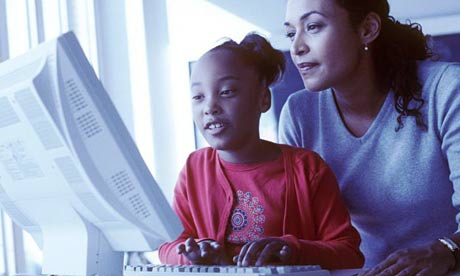
First, they can locate computers in a common room such as the den, a playroom or the parent's bedroom rather than in a child's bedroom. Children will be less likely to seek out inappropriate information and parents can more easily monitor the website they are visiting. It is also very important to talk with your children about possible dangers on the web. Let them know what dangers are out there and to come to you if they are having a problem. Also, take an interest in what they do when they are online. Who are they chatting with   
e-mailing? What are they doing when they are online? What websites are they looking at online

 What are some general guidelines parents can teach children about Internet safety?
Don't give out personal information (Name, Address, Age, School, Birthday, Phone Number, etc.)*
Choose a screen name that doesn't identify any personal information. Examples of bad screen names: saragirl15, tommyboy, girl-in-denver, babygirl12.
Don't share your password with anyone except your parents. Not even your best friend.*
Do not respond to unwanted, mean, offensive or threatening e-mail, chat room dialogue, or instant messages.
Don't send pictures of yourself to someone you don't know. *
NEVER agree to meet someone you met on the Internet.
Remember people online may or may NOT be who they say they are.
Promise to tell an adult if you ever feel uncomfortable while online.
 
this videos shows the child know what to do


also -this another website


___________________________________________________________________________
Amani

Children and Internet Safety 

Here are some general guidelines:

  • Place your computer in an open room with the monitor facing out. This allows you to see and control what is occurring on the Internet.
  • Educate your children about the Internet, both the positives and the potential dangers.
  • Bookmark child-friendly web sites. This allows your children to easily get to safe sites that they have used before.
  • Teach your children that Internet safety means never giving out personal information over the Internet.
  • Share your Internet child safety experiences, both good and bad, with others.
  • Teach your children to refrain from chat rooms.
  • Don't install Peer-to-peer applications. A high percentage of what occurs with children and peer-to-peer applications is related to either illegal or immoral activities.
  • Teach children to crash and tell. If they encounter a bad experience, they should feel comfortable in immediately turning off the computer and talking with a parent about the experience.
  • Never allow your children to meet with someone from an online session unless the parent approves.
  • Know the parents of your children's friends.
  • Teach children to never open email from someone they don't know.
  • Never respond to an unsubscribe on a pornographic email. If you or your child receives a message that is harassing, of a sexual nature, or threatening, forward a copy of the message to your ISP, and ask for assistance.

:video

____________________________________________________________________________

bayan__

The Internet can be a wonderful resource for kids. They can use it to research school reports, communicate with teachers and other kids, and play interactive games. Kids who are old enough to punch in a few letters on the keyboard can literally access the world.
But that access can also pose hazards. For example, an 8-year-old might do an online search for "Lego." But with just one missed keystroke, the word "Legs" is entered instead, and the child may be directed to a slew of websites with a focus on legs — some of which may contain pornographic material.
That's why it's important to be aware of what your kids see and hear on the Internet, who they meet, and what they share about themselves online.
Just like any safety issue, it's wise to talk with your kids about your concerns, take advantage of resources to protect them, and keep a close eye on their activities.

Internet Safety Laws
A federal law, the Children's Online Privacy Protection Act (COPPA), was created to help protect kids online. It's designed to keep anyone from obtaining a child's personal information without a parent knowing about it and agreeing to it first.
COPPA requires websites to explain their privacy policies on the site and get parental consent before collecting or using a child's personal information, such as a name, address, phone number, or Social Security number. The law also prohibits a site from requiring a child to provide more personal information than necessary to play a game or participate in a contest.
But even with this law, your kids' best online protection is you. By talking to them about potential online dangers and monitoring their computer use, you'll help them surf the Internet safely.
Online Protection Tools

Online tools are available that will let you control your kids' access to adult material and help protect them from Internet predators. No option is going to guarantee that they'll be kept away from 100% of the risks on the Internet. So it's important to be aware of your kids' computer activities and educate them about online risks.
Many Internet service providers (ISPs) provide parent-control options to block certain material from coming into a computer. You can also get software that helps block access to certain sites based on a "bad site" list that your ISP creates. Filtering programs can block sites from coming in and restrict personal information from being sent online. Other programs can monitor and track online activity. Also, make sure your kids create a screen name to protect their real identity.


Getting Involved in Kids' Online Activities
Aside from these tools, it's wise to take an active role in protecting your kids from Internet predators and sexually explicit materials online. To do that:

Become computer literate and learn how to block objectionable material.
Keep the computer in a common area, not in individual bedrooms, where you can watch and monitor its use.
Share an email account with your child so you can monitor messages.
Bookmark kids' favorite sites for easy access.
Spend time online together to teach your kids appropriate online behavior.
Forbid your child from entering private chat rooms; block them with safety features provided by your Internet service provider or with special filtering software. Be aware that posting messages to chat rooms reveals a user's email address to others.
Monitor your credit card and phone bills for unfamiliar account charges.
Find out what, if any, online protection is offered by your child's school, after-school center, friends' homes, or anyplace where kids could use a computer without your supervision.
Take your child seriously if he or she reports an uncomfortable online exchange.
Forward copies of obscene or threatening messages you or your kids get to your Internet service provider.
Call the National Center for Missing and Exploited Children at (800) 843-5678 if you're aware of the transmission, use, or viewing of child pornography online. Contact your local law enforcement agency or the FBI if your child has received child pornography via the Internet.

Many sites use "cookies," devices that track specific information about the user, such as name, email address, and shopping preferences. Cookies can be disabled. Ask your Internet service provider for more information

Basic Rules

Set up some simple rules for your kids to follow while they're using the Internet, such as:
Follow the rules you set, as well as those set by your Internet service provider.
Never trade personal photographs in the mail or scanned photographs over the Internet.
Never reveal personal information, such as address, phone number, or school name or location. Use only a screen name. Never agree to meet anyone from a chat room in person.
Never respond to a threatening email or message.
Always tell a parent about any communication or conversation that was scary.
If your child has a new "friend," insist on being "introduced" online to that friend.
Chat Room Caution
Chat rooms are virtual online rooms where chat sessions take place. They're set up according to interest or subject, such as a favorite sport or TV show. Because people can communicate with each other alone or in a group, chat rooms are among the most popular destinations on the Web — especially for kids and teens.
But chat rooms can pose hazards for kids. Some kids have met "friends" in chat rooms who were interested in exploiting them. No one knows how common chat-room predators are, but pedophiles (adults who are sexually interested in children) are known to frequent chat rooms.
These predators sometimes prod their online acquaintances to exchange personal information, such as addresses and phone numbers, thus putting the kids they are chatting with — and their families — at risk.
Pedophiles often pose as teenagers in chat rooms. Because many kids have been told by parents not to give out their home phone numbers, pedophiles may encourage kids to call them; with caller ID the offenders instantly have the kids' phone numbers.

Warning Signs
Warning signs of a child being targeted by an online predator include spending long hours online, especially at night, phone calls from people you don't know, or unsolicited gifts arriving in the mail. If your child suddenly turns off the computer when you walk into the room, ask why and monitor computer time more closely. Withdrawal from family life and reluctance to discuss online activities are other signs to watch for.
Contact your local law enforcement agency or the FBI if your child has received pornography via the Internet or has been the target of an online sex offender.
Taking an active role in your kids' Internet activities will help ensure that they benefit from the wealth of valuable information it offers without being exposed to any potential dangers

MORE ON THIS TOPIC

Watch this video


______________________________________________________________________________

salma

Risks arising from the use of the Internet:-
Mgayertan there are two issues regarding the safety of the Internet, the first is the suffering of the children on the Internet, whether intentional (such as entering the sites do not want to inform them of it) or unintentionally.
The second important issue is direct contact between the child and another person on the network may lead to the disclosure of the information your child may be subjected to his family or personal risk.
Perhaps the most admired individuals in the communication via the Internet is an unknown. Children can communicate with any one online Ihdhm not the appearance or age or any other aspects that may affect the real communication. Which gives a sense of freedom and embark on the relations arising through the Internet, and often read reports on the talk-scale, mature themes revolve between adults and other people online, Iznhm senior adults, and then discover later that they are just children or adolescents.


Safety on the Internet :-
There are lots of methods that provide for the protection of children from exposure to pornographic sites and pornographic and other inappropriate websites on the Internet. One of these methods to identify software that allows parental control on the Internet and used to prevent certain programs and sites. You can also use an option file storage addresses of sites visited on the Internet and check them once a week at least. Make sure you know of sites that enters your children and time spent there.
In other words, created a way that allows your computer to your children using the Internet as a source of learning and not as a reaction to. And remember that the value of the entire Internet is in the side of cultural, educational, and not in other aspects. If you were not you have to know how to configure your computer and adjusted for this purpose, contact the service providers to ask them to explain to you step by step.
If you allow your child to interact with other people via the Internet, in any form, you must identify these basic rules of his precision and clarity:
• Do not reveal your password to connect to the Internet to anyone, regardless of who is or who he claims.
• Do not divulge any personal information about you, whether your name or address or the name of the parent or the phone number or the name of your school or any other details.
• Do not send pictures of yourself or any one of your family members ever online.
• Do not connect the newly makes you feel uncomfortable with anyone on the Internet, whether to take a personal characteristic or the modern terms which incorporates hints or inappropriate.
Close Line, simply moved to another location on the Internet, then tell your parents what happened.
• Tell your parents always looking for any communication containing a threat or verbally abusive.
• Do not agree never to meet any person in any circumstances, and tell your parents off for anyone who suggests that you do so.
• Do not accept offers for products or any other opportunities you receive via the Internet without the express consent of your parents.
• Do not reveal the residential address to receive product by mail, ActiveSync mailbox number if necessary.
• Remember that people you meet online may be anyone from anywhere. Be careful for you and your family.
• Think and you explain to your children these rules in the natural weakness of the child about the adults who enjoy the experience, knowledge and ability in persuasion to influence the child. Therefore, to explain these rules to children is easy in concept but it may be very difficult in practice. Think of ways to build the trust between you and your child to tell you about all her concerns.

...

Video


link


_______________________________________________________________________________
basma 

The Internet can be a wonderful resource for kids. They can use it to research school reports, communicate with teachers and other kids, and play interactive games. Kids who are old enough to punch in a few letters on the keyboard can literally access the world.
But that access can also pose hazards. For example, an 8-year-old might do an online search for "Lego." But with just one missed keystroke, the word "Legs" is entered instead, and the child may be directed to a slew of websites with a focus on legs — some of which may contain pornographic material.
That's why it's important to be aware of what your kids see and hear on the Internet, who they meet, and what they share about themselves online.
Just like any safety issue, it's wise to talk with your kids about your concerns, take advantage of resources to protect them, and keep a close eye on their activities.
Internet Safety Laws
A federal law, the Children's Online Privacy Protection Act (COPPA), was created to help protect kids online. It's designed to keep anyone from obtaining a child's personal information without a parent knowing about it and agreeing to it first.
COPPA requires websites to explain their privacy policies on the site and get parental consent before collecting or using a child's personal information, such as a name, address, phone number, or Social Security number. The law also prohibits a site from requiring a child to provide more personal information than necessary to play a game or participate in a contest.
But even with this law, your kids' best online protection is you. By talking to them about potential online dangers and monitoring their computer use, you'll help them surf the Internet safely.


_______________________________________________________________________________

this another blog talk about Children and Internet Safety
http://gruopflowers.blogspot.com/  

الأحد، 7 نوفمبر 2010

Education technology in early childhood

I want to be up-front with you. I am a strong advocate of using technology in the home and classroom—in appropriate ways. My answer to the title of this article is an unequivocal “No!” I support the use of technology with young children for a number of reasons.

First, today’s children are the generation.com. They have a great deal of involvement with technology and have spent many years playing with and learning from technology. Children as young as nine months are using the computer, while nestled securely in their parents’ laps. Programs such as Reader Rabbit and Jump-Start Baby are designed for the lapware set. These software programs and others like them constitute the fastest growing software on the market today. They are easy and fun to use, and children learn from them.

A second reason I support the use of technology with children is that the use of technology in early childhood programs can begin to level the educational playing field and close the digital divide that exists between the haves and have-nots of technology. Children from minority and low-income families have less access to computers and the Internet than do their more advantaged classmates.* Having access to and use of computers and other technology at school can help all children get the knowledge and skills they need to be successful in school and life.


I recommend that all early childhood classrooms have a technology center that includes a computer, access to the Internet, a printer, a digital camera, and appropriate learning software.

Here are some guidelines you can use to integrate various kinds of technology into your classroom and programs:
  1. Remember that technology does not replace the teacher. Computers and other technology are learning tools designed to help children learn and to extend and enrich their learning.
  2. Apply developmentally appropriate practices to your use of technology with young children. This means you should take into consideration the age, developmental levels, and the individual needs of your children when selecting technology and software for them.
  3. Collaborate with parents to help them work with their children so that they are not spending all of their time watching television or playing/working with computers.
  4. Advise parents about the American Academy of Pediatrics recommendation that children under two not be allowed to watch television or work on computers.
  5. Monitor children’s use of iPods and other forms of technology that use earphones. Research suggests that it’s not how long children listen, but the volume at which they listen to the music.
this videos shows how to use Education technology in early childhood   


also -this another website


____________________________________________________________________________

bayan


Young children have needs that are real and different from those
of older children and adolescents. Children from birth to age
eight are learning rapidly, using all of their senses and their
entire bodies to take in sensations and experience the world
around them. During this period of their lives they learn
through their play and exploration across five essential developmental
dimensions. These dimensions include:
? Social and Emotional Development. The ability to form and
sustain relationships gives meaning to learning experiences.
Responsive interactions provide a sense of well-being that
enables children to form attachments with others and participate
positively in educational activities.
? Language Development. Language empowers children to
participate in both the cognitive and affective parts of the educational
program. Experience with written and oral language
provides children with the tools to interact with others, and to
represent their thoughts, feelings, and experiences.
? Physical Well-Being and Motor Development. A child’s health
is connected to preparedness for and performance in learning
activities. Healthy children are able to focus on and actively
engage in experiences crucial to the learning process.
? Cognition and General Knowledge. Children need opportunities
to interact with the people and objects in their environment,
and to learn from their surroundings. Experiences and interactions
with peers and adults allow children to construct knowledge
of patterns, understand relationships between objects or
events, and learn ways to solve problems.
Video


also -this another website
http://www.brainpop.com/


_____________________________________________________________________________


basma


Low Tech/High Touch
Child care tends to be a low tech profession
with a strong preference for high
touch learning experiences. Most child
care professionals, unlike the young
children in their care, have come to
computers as adult learners and can be
resistant to using technology when
face-to-face interactions and relationships
are at the heart of their work

video


also -this another website
http://childrenstech.com/


_____________________________________________________________________________
salma


Did you know that experts argue that the child at the age of two or three years can use the computer and the age of four sailing in the world of the Internet. Where the children of the third millennium are no longer attracted by traditional games. Experts say in this area that the computer is an animal patient and a good tool to learn because it allows the child to become effective personal unlike television Moreover, it urges that the different perceptions of the brain.

Marlena, "said Roberto, Professor of Technology at the University of Rome and author of the book

EsseriMultimedial

Or Be very brokers In this age of the child match words and objects through a computer develops its capabilities and to identify the sounds and images can also zoom out and zoom, which develops has a visual and audio senses.

In the pre-school, the child develops coordination between movement and vision and sound, so be very helpful to use a computer mouse and keyboard.


And the computer such as an open book to be more effective and children are attracted strongly to the computer, so the child is used frequently, but it is necessary to control the period during which the child before the Ijlsha Almontour not more than two or three hours a day.

Experts warn of the computer as a babysitter and when moving the child to this world prefer to stay next to him when it is small.

Finally, the computer world and the amazing world of stunning and develop children's sense of observation, imagination and knowledge of shapes and sizes from 3 6 years, and develop the capacity of innovation and more than two years, and develop the capacity of design, control, and creating characters.

It can also discover the numbers and words and images from 3 to 7 years

Video


_______________________________________________________________________________

amani77


In an era where technology has become an integral part of daily life and the process

Education even at the level of kindergarten, I recommended in my studies, including the following:

▫ the introduction of computers in education of children of kindergarten and choose the devices commensurate with young children, such as touch screens, and runaways, keyboards color and supplements of the computer and Paintings commensurate with the children, with the need to put the devices in place an appropriate and safe in the classroom and at home.

▫ create specialized portals for children in general and young children in kindergarten in particular match the orientation and stage of development the design and content of the preparation of a group of specialists, with the need to update their content and follow-up, develop and add to it constantly.

▫ web design for young children and easy to open, browsing, and the use of audio instructions and guidance. It is necessary to be interactive, and the need to use large fonts and clear, the colors of the background defaults colors, fonts, and the use of classical Arabic language sites children, and writing in Arabic instead of translating the stories and information from the English language and the development of links to foreign sites.

▫ design attractive sites dedicated to teaching children basic literacy and numeracy and other skills of the preparedness of the school depends on the colors, music, digital photos, video clips and animation.

▫ Development of criteria for good and safe sites for children in pre-school.

▫ define parameters pre-service computer sites that are commensurate with kindergarten children, and ways to integrate technology into kindergarten classrooms, and how Isammn lessons depends on the technology.

▫ training kindergarten teachers during the service to use the computer and the Internet, and how they are looking, and where to find appropriate sites for children, and the preparation of handbooks and manuals induction of the parameters, and the involvement of the parameters in the newsgroups and discussion groups related to children before school age and the use of technology in education.

▫ the need for accompanying parents and teachers of kindergarten children as they browse the Internet, and assist them in drawing, painting and educational games and read stories on the screen.

▫ creation of an association such as the Association WireKids to enable children to use the Internet safely and in ways appropriate to their age, and the development of laws to protect children while surfing the Internet and sites, and the need for parental consent to browse the child has, with control of information which is sent to children, enable parents to access to the information collected from children, and the need for supervision of parents and teachers on children while surfing the Internet.
video